Test Scene
Example usage of Haptology Unity Plugin
Scene
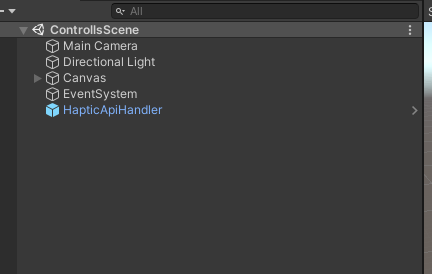
- Before you add any other object, you have to add
HapticApiHandler.prefabto the scene
- Then you can add
HapticBehaviorto an element in the scene
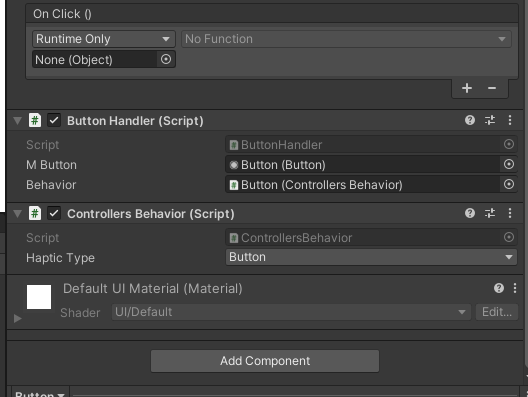
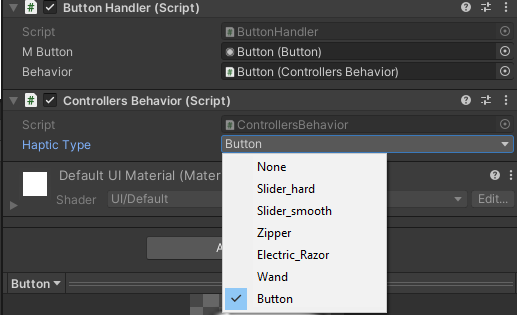
- Choose
Haptic Typefrom the drop-down list
Example of code:
using UnityEngine;
using UnityEngine.UI;
using Haptology;
using System.Collections;
public class ButtonHandler : MonoBehaviour
{
    public Button mButton;
    public ControllersBehavior behavior;
    private bool mRunning = false;
    void Start()
    {
        mButton.onClick.AddListener(OnClick);
    }
    void OnClick()
    {
        if (!mRunning)
        {
            StartCoroutine(runBehavior());
        }

    }

    IEnumerator runBehavior()
    {
        mRunning = true;
        behavior.HapticCollision();
        yield return new WaitForSeconds(2);
        behavior.StopHapticCollision();
        mRunning = false;
    }
}
This example code shows us how to handle Stream in the system.
When you click on a button you send HapticCollision
After 2 seconds you send StopHapticCollision to stop the stream.
All of this is available in ControllersScene in Example\Controller